Menu
News
14.06.2020 - New module "New Living Translation" is available. Download
19.02.2020 - New module "French Darby" is available. Download
14.03.2017 - New module "Spanish Reina-Valera" is available. Download
07.07.2016 - New modules "Korean Living Bible 1985", "New Revised Korean Version 1998", "Biblia Hebraica" are available. Download
22.09.2015 - Version for OneNote 2016 is available now. Download
30.03.2015 - New module "New International Version (1984) (US)" is available. Download
27.04.2014 - New version 3.3 is available. Download
24.03.2014 - Microsoft OneNote now FREE! More...
01.01.2014 - New video is available: "Beginning to work with BibleNote"
Contact
Please send all questions or comments via email to: support@BibleNote.pro
The Two Keys
Key 1. While studying the Bible, we have taken a lot of notes: sermon notes, Bible courses, conferences and lessons of Bible study. Over time, these documents, commentaries, notes, and other related information become very difficult to manage. Sometimes, while reading or studying a portion of Scripture, we recall that we have already studied the passage and taken notes. We think, "It would be great if it was possible to see all my notes for this passage in one place..."
Key 2. All of our notes and comments are related to a particular topic. Biblical references mentioned in our notes relate to each topic. That is, they relate to each other within a certain context. If we were able to view all our notes and comments related to a specific passage, then we could consider this passage of Scripture from the viewpoint of different themes and interpret the passage from the perspective of other places of Scripture. In other words, we can use what we have learned in the past about a Bible passage to develop our own system of cross-referencing!
Implementation
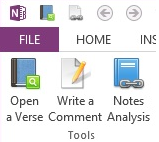
The Lord has provided a way to bring these two keys to reality.
The program uses Microsoft OneNote to organize your notes.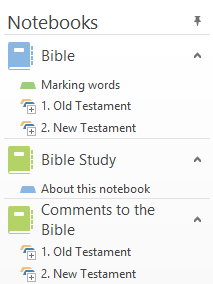 The idea is this: the entire Bible, and everything connected with it (courses, sermons, books, etc.) is stored in OneNote.
We have also added some cool features to help you with your note taking.
The idea is this: the entire Bible, and everything connected with it (courses, sermons, books, etc.) is stored in OneNote.
We have also added some cool features to help you with your note taking.
First, the program allows you to open a passage of Scripture, making it very easy to navigate.
Second, the program allows you to write notes and comments about any passage of Scripture or about any word in the Bible (and you can write as much as you want).
And best of all, the program will analyze your notes and link them to the Bible. So while your reading the Bible, you can see the notes you have taken about any verse!
Using BibleNote (OneNote IStudyBibleTools) for studying the Bible allows you to:
- Organize all the notes you have taken during your Bible study;
- Create your own cross-referencing system;
- Write your own Bible commentary;
- Quick access to all your notes;
- Have the complete Inductive Study Bible on your computer.
More details about how to use OneNote, the Bible study software application, and additional programs for self-study of the Bible are located in the manual.
God bless you in this fascinating journey through His Word!